Your calendar already knows what to bill.
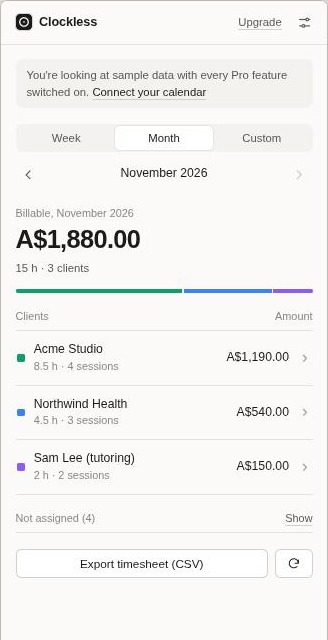
Clockless reads your Google Calendar, works out which meetings belong to which client, and adds up the hours. When the month ends, it turns them into an invoice. You never have to start a timer.
Free on the Chrome Web Store: two clients and your first invoice, no card needed. A Google Calendar add-on is coming later.
How it works
-
Add a client
Set an hourly rate, then tell Clockless how to recognise their meetings. Usually that's just their email domain, like acme.com. A word in the title or an event colour works too.
-
Keep using your calendar
Book meetings and sessions the way you already do. Clockless rounds each one to your billing increment and skips all-day events and meetings you declined.
-
Invoice in one click
Pick a client and Clockless creates a tax invoice with your ABN, GST or VAT details. It then marks those hours as invoiced so nothing gets billed twice or forgotten.
Private by design
Clockless asks for read-only access and does all its work inside your browser or your Google account. Your events are never copied to our servers. We don't have servers that could store them.
Works where you do
Clockless opens in Chrome's side panel next to any tab, including Google Calendar. Export timesheets as CSV for Google Sheets or Excel, and save invoices as PDF. A Google Calendar add-on is coming later.
Guides
Pricing
| Free | Pro | |
|---|---|---|
| Price | Free | A$11 a month, or A$99 a year |
| Clients | 2 | Unlimited |
| Periods | This week and this month | Any period, including past months |
| Timesheet export | Yes | Yes |
| Tax invoices (PDF) | First one free | Unlimited |
| Tracks invoiced hours | – | Yes |
Cancel any time. Prices are in Australian dollars. Outside Australia, your bank converts the charge to your currency.
Questions
Who is Clockless for?
Anyone who bills by the hour and keeps their sessions in Google Calendar: freelancers, consultants, contractors, tutors, coaches and therapists.
Do I have to change how I use my calendar?
No. If your clients are invited to your meetings, matching by email domain works straight away. Otherwise use a word in the event title or an event colour.
What if a meeting is matched to the wrong client?
In the Chrome extension you can reassign or exclude any single event. In both versions you can adjust a client's matching rules at any time.
Can I use it outside Australia?
Yes. Set your own currency, tax name and tax rate, or set the rate to zero.
How do I cancel?
From the extension's settings, or from the link in your receipt email. You keep Pro until the end of the period you've paid for.